For Claude.ai · Pro, Max & Team

Know you're about to hit
the limit — before you do

CapMeter lives in your Mac's menu bar and watches how fast you're burning through your Claude session — browser and Claude Code alike. It estimates when you'll run out and warns you there, on a floating widget, or straight to Slack & Discord — so the limit stops catching you mid-task.

Get on the App Store See it in action

Free 14-day trial · $14.99 once · Privacy Policy

Opens in demo mode without an account — look around before you sign in anywhere.

Predicts & warns — not just a number
Fully local — Keychain-encrypted, no servers
Menu bar app — macOS 12+, Apple Silicon
$14.99 once — no subscription
Live demo

Watch it work — right on your desktop

An interactive recreation of the app — scroll to step through it.

Finder File Edit View Go Window Help
38%
New chat
Recents
Refactor auth flow
Draft launch email
Explain vector DBs
SQL query help
Can you rewrite this function to use async/await and add error handling?
Here's the refactored version using async/await with proper error handling and retries:
async def fetch_data(url):
  try:
    async with session.get(url) as r:
      return await r.json()
  except ClientError as e:
    logger.warning(f"retry: {e}")
The key changes: the call is now non-blocking, and network failures are caught and logged instead of crashing.
Nice. Can it retry a few times before giving up?
Sure — wrap it in a loop with exponential backoff so each retry waits a little longer:
for attempt in range(3):
  try:
    return await fetch_data(url)
  except ClientError:
    await asyncio.sleep(2 ** attempt)
This gives it three attempts with 1s, 2s, then 4s waits — enough to ride out most transient network blips.
Send a message…
38
3h 49m left
⚡ limit in ~1h 18m
Extra usage ~$3.20/hr $17.00 left
Acme Team — Slack
Acme A
Channels
# general
# alerts
# dev
# random
# alerts ·  usage notifications
D
Devon 1:40 AM
shipping the release now 🚀
CapMeter APP 2:09 AM
⚡ CapMeter — 80% threshold reached
▰▰▰▰▰▰▰▰▱▱80%
👤 you@example.com  ·  ⭐ Claude Pro  ·  🔄 Resets at 05:20
Claude — 80% used now
Current session is running low. Resets at 05:20 AM.
Full breakdown in one click
Session %, burn rate, and exact time until reset
How it works

Install, open, done

1

Download from the App Store

Free for 14 days. Just install and open.

2

It reads your own session — locally

No API key. You sign in to Claude once, on Claude's own sign-in page, and CapMeter keeps that session encrypted in the macOS Keychain — on your Mac. It never touches a server of ours and never reads your chats.

3

See your limits in real time

A live ring in your menu bar and a floating widget show exactly how much session you have left.

Features

More than a live percentage

The number itself is the easy part. CapMeter is built around what comes after it — seeing the limit coming, and telling you somewhere you'll actually notice.

Limit prediction

CapMeter measures your burn rate and turns it into a time — "limit in ~1h 18m" — so you pace yourself instead of getting cut off mid-thought. It's an estimate from your recent pace, updated as you go.

Alerts that reach you

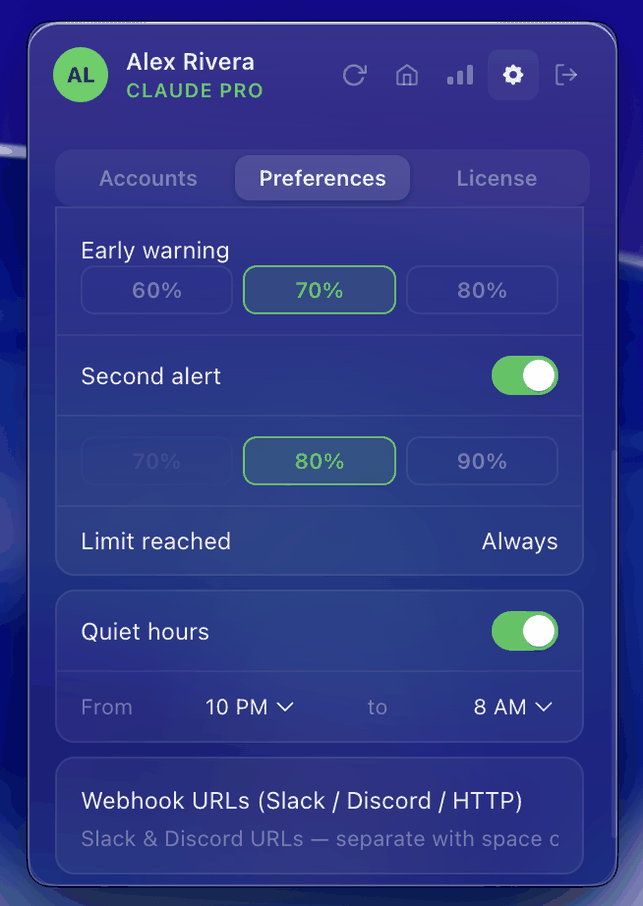
Get warned at your own thresholds — as a macOS notification or pushed straight to Slack & Discord. Set quiet hours so you're never pinged while you sleep.

Floating widget

A draggable mini-widget that floats above every window and Space — your remaining session always in view. When pay-as-you-go credits are on, it adds a second line tracking your spend rate and balance.

All your usage windows

Your current session (5-hour), your weekly window, and any per-model weekly limits your account reports — each as its own row with its own countdown. Model names come straight from Claude, so new ones appear on their own. Browser and Claude Code draw from the same limits, and both land in one counter.

History & export

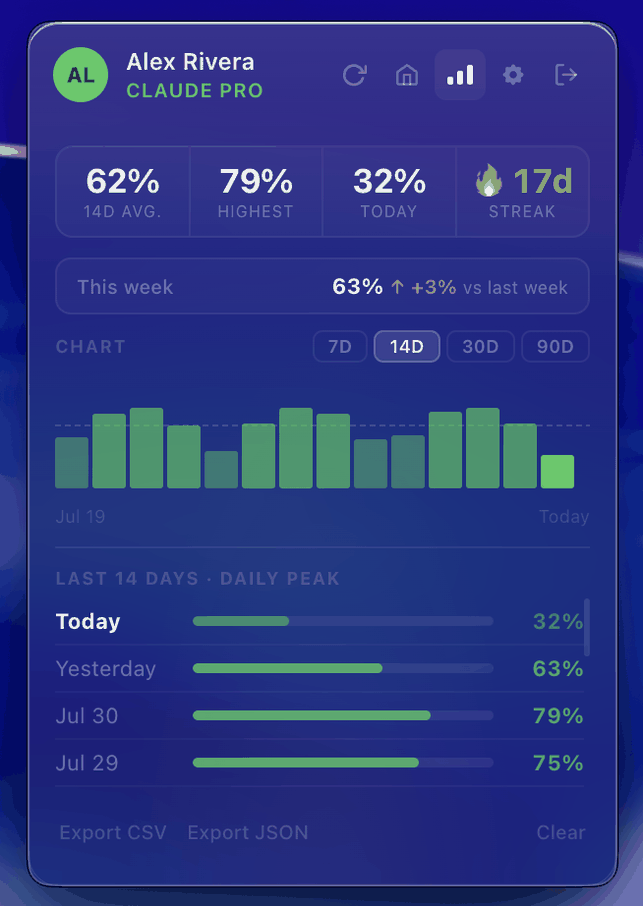
7, 14, 30 and 90-day bar charts, weekly comparison and streaks. Export everything as CSV or JSON whenever you want.

Live menu-bar ring

The baseline, done right: a color-coded ring shifts green → orange → red as you approach the limit. Always visible, zero clicks.

A closer look

Right where you work

A rich popup one click away in the menu bar.

Usage history and charts

History & trends
7, 14, 30, 90-day charts, streaks & export

Notification settings

Alerts your way
Thresholds, quiet hours, Slack & Discord

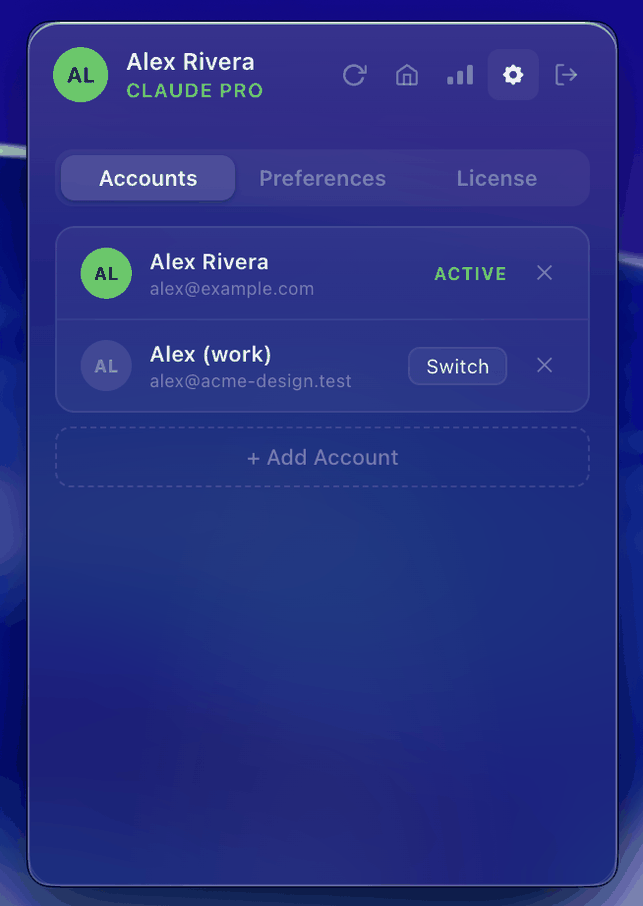
Multiple Claude accounts

Multiple accounts
Switch in one click

Your data stays on your Mac

CapMeter reads usage from your own Claude.ai session and keeps everything on-device. Your session token is encrypted in the macOS Keychain, and the app talks only to claude.ai — plus any Slack, Discord or HTTP webhook you set up yourself. No servers of ours, no analytics, no tracking, no backend. It never accesses your conversations.

You don't have to take that on trust: the app is sandboxed by the Mac App Store, and a network monitor like Little Snitch will show you the only host it ever contacts.

Questions

The things you're probably wondering

Does my Claude Code usage count towards this?

Yes. Anthropic's own docs put it plainly: "Both Pro and Max plans offer usage limits that are shared across Claude and Claude Code, meaning all activity in both tools counts against the same usage limits." CapMeter reads your account-level usage, so terminal work and browser chats land in the same number.

It doesn't break the total down by which client burned it — it shows the total your account reports.

What happens when the 14 days are up?

Your menu-bar session counter keeps working — you don't lose the thing you installed it for. What locks is the layer on top: limit prediction, notifications and quiet hours, the floating widget, webhooks, history and export, multiple accounts. The menu-bar display falls back to the ring on its own, and refreshes drop to every 30 minutes.

Buy the unlock and everything picks up where it left off. Nothing is deleted in the meantime.

Why $14.99 when there are free ones?

The free counters show you a live percentage and they do it well. What you're paying for is the layer above it: the burn-rate estimate, alerts that reach you in Slack or Discord, quiet hours, history you can export, and a widget that stays above every window.

You get all of it free for 14 days first. If that layer doesn't earn its place in your day, you never pay — and it's one payment, not a subscription.

What if Anthropic changes how usage is reported?

Then CapMeter can't read your usage until I ship an update through the App Store. There's no remote config or fallback that would fix it silently. It's the sharpest dependency in the design and I'd rather you hear it from me than discover it.

What if you stop working on it?

The app keeps running. There's no server of mine behind it — there never was — and no subscription that expires, so nothing switches off when I do. Your history lives on your Mac and exports to CSV or JSON whenever you want it.

The honest risk isn't billing, it's the one above: if the usage endpoint changes and no update ships, the counter stops. This is a one-person project.

Can I get a refund?

Purchases go through the App Store, so refunds are Apple's call, not mine — you'd request one at reportaproblem.apple.com. That's why the real safeguard is the trial: 14 days with every feature unlocked, before any money changes hands.

Does it work on a Team plan?

It's built for Pro, Max and Team, but I don't have a Team account to test with. If your plan pools limits at the organisation level, the numbers may describe the org rather than just you. The 14-day trial means you'll see that before you pay — and I'd genuinely like to hear what you see.

Does it run on an Intel Mac?

No — Apple Silicon only, macOS 12 or later. Mac App Store builds aren't thinned, so shipping a universal binary would make every M-series user download an Intel slice they'd never run. The App Store will simply tell you it's not compatible rather than letting you buy something that won't install.

Pricing

Try it free, then pay once

Download free and use every feature for 14 days. One in-app purchase unlocks it for good — no subscription.

One-time unlock
$14.99

After a free 14-day trial · No subscription

Coming soon to the Mac App Store

The menu-bar ring, your session and 7-day windows and the frosted glass theme keep working without the unlock — the list above is what the purchase adds.

Coming soon on the Mac App Store

Requires an active Claude.ai account · macOS 12+

System requirements: macOS 12.0 Monterey or later · Apple Silicon (M1 or later) · Requires an active Claude.ai account